| Ethernet Cable Colors: Color Code Standards
The
information listed here is to assist Network Administrators
in the color coding of Ethernet cables. Please
be aware that modifying Ethernet cables improperly may cause
loss of network connectivity. Use this information at your own
risk, and ensure all connectors and cables are modified in
accordance with TIA standards.
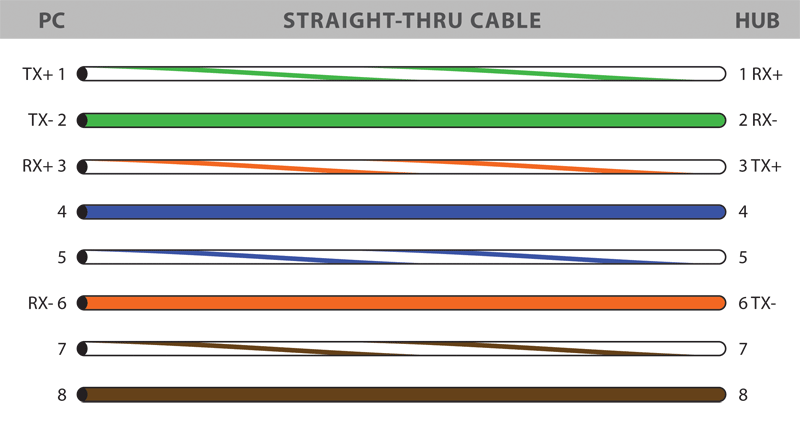
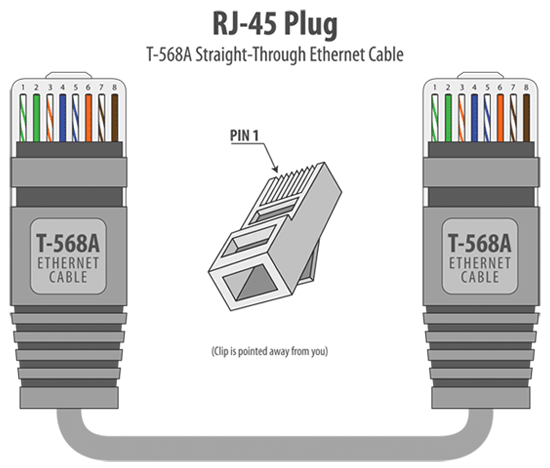
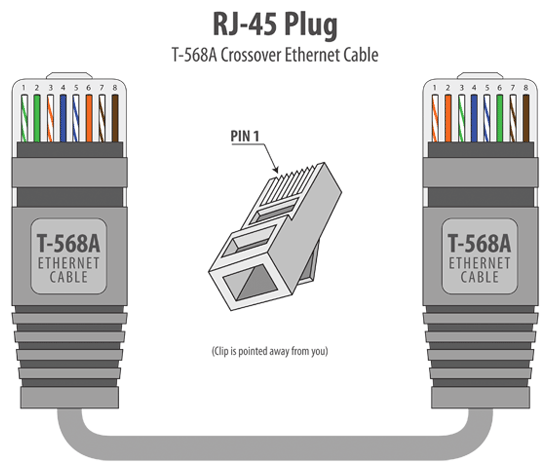
Basic Theory:By looking at a T-568A UTP Ethernet straight-thru cable and an Ethernet crossover cable with a T-568B end, we see that the TX (transmitter) pins are connected to the corresponding RX (receiver) pins, plus to plus and minus to minus. You can also see that both the blue and brown wire pairs on pins 4, 5, 7, and 8 are not used in either standard. What you may not realize is that, these same pins 4, 5, 7, and 8 are not used or required in 100BASE-TX as well. So why bother using these wires, well for one thing its simply easier to make a connection with all the wires grouped together. Otherwise you'll be spending time trying to fit those tiny little wires into each of the corresponding holes in the RJ-45 connector. T-568A Straight-Through Ethernet Cable Cat5e Cables | Cat6 Cables
The T-568A standard is supposed to be used in new network
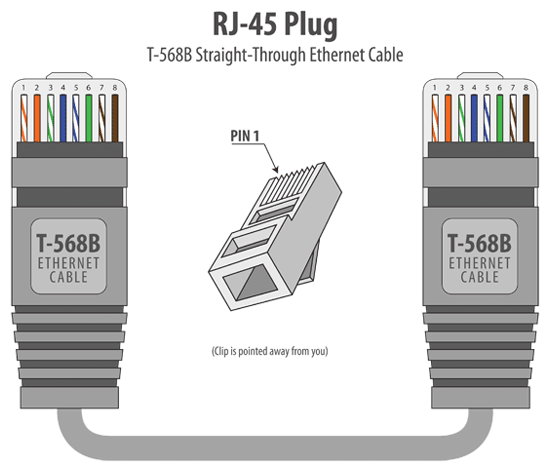
T-568B Straight-Through Ethernet CableCat5e Cables | Cat6 Cablesinstallations. Most off-the-shelf Ethernet cables are still of the T-568B standard; however, it makes absolutely no functional difference in which you choose.
Both
the T-568A and the T-568B standard Straight-Through cables
are used most often as patch cords for your Ethernet connections.
If you require a cable to connect two Ethernet devices directly
together without a hub or when you connect two hubs together,
you will need to use a Crossover cable instead.
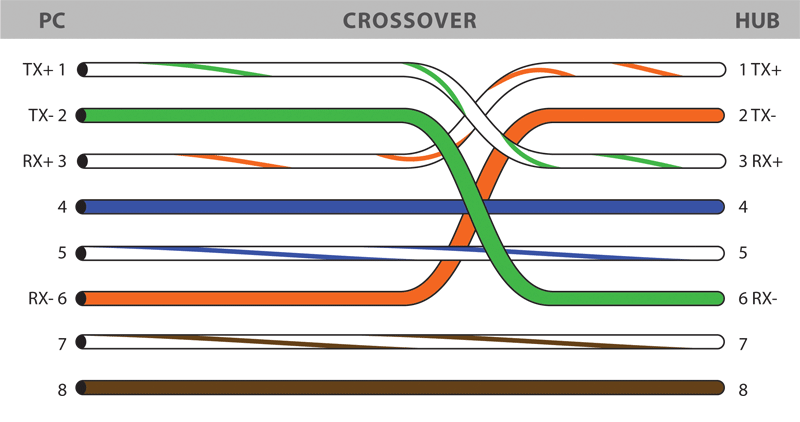
RJ-45 Crossover Ethernet CableCat5e Crossover Cables | Cat6 Crossover Cables
A
good way of remembering how to wire a Crossover Ethernet
cable is to wire one end using the T-568A standard and the
other end using the T-568B standard. Another way of remembering
the color coding is to simply switch the Green set of wires in
place with the Orange set of wires. Specifically, switch the
solid Green (G) with the solid Orange, and switch the
green/white with the orange/white.
How to Build an Ethernet Cable Instructions:
|      |
Ethernet Cable Tips:
| |
Saturday, 14 December 2013
RJ45 Colors and Wiring Guide Diagram TIA / EIA 568 A B

Subscribe to:
Post Comments (Atom)
No comments:
Post a Comment